
Hiring Claude
Going full intravenous AI in open-source

I’ve been using Claude Code intensively on the open-source Necromunda app, Gyrinx. We’ve got Claude set up in full agent mode, running in CI in response to comments on issues.
It’s enabled me to move at the pace of a development team, working on two or three features at once, and has empowered non-technical teammates to spec work and get features built with just a small amount of prompting from me.
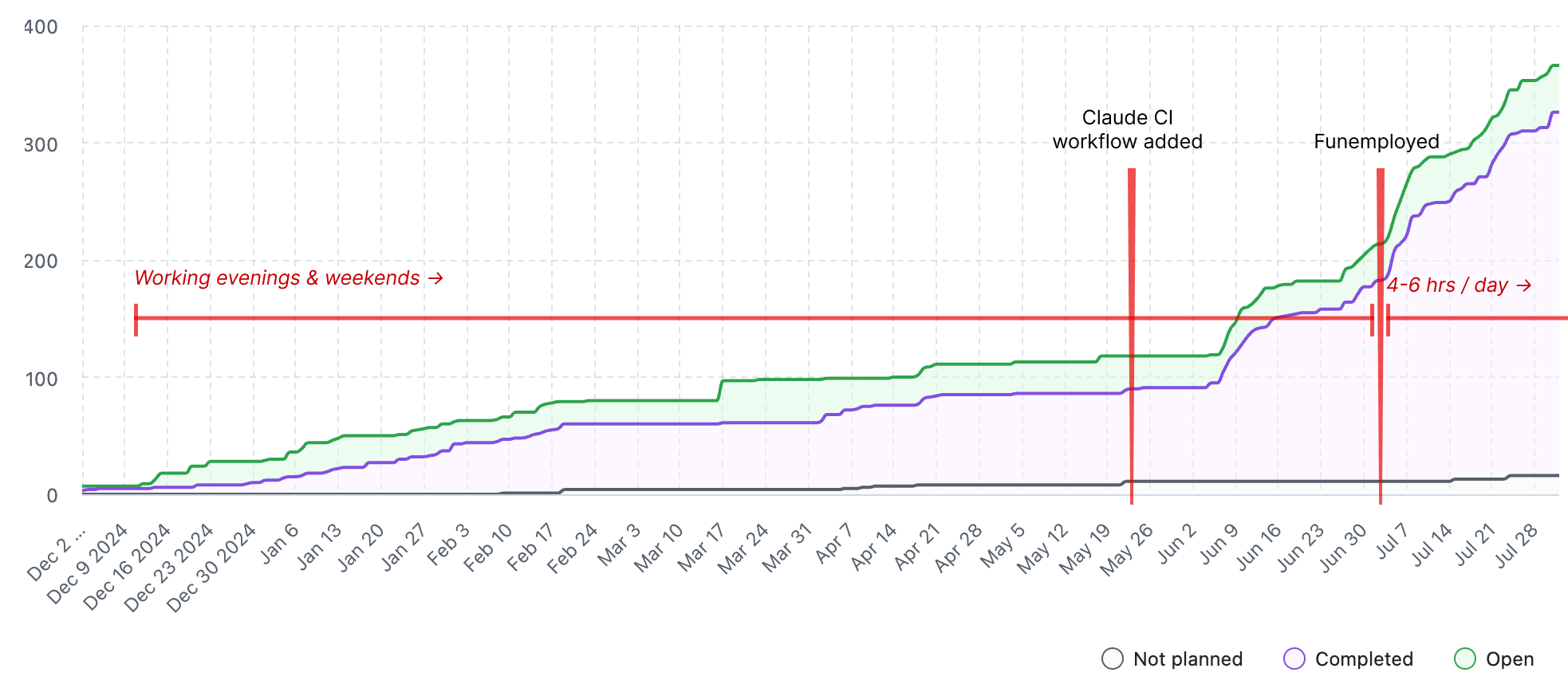
The stats over the last 2 months look reasonably good, and about half of this was while I only had spare time to spend on the project:
We’ve landed >250 PRs — roughly 4 per day
The Claude bot (in CI) has shipped >130 commits (40,000 ++, 6,000 --)
Claude Code locally has added >30 commits (25,000 ++, 6,500 --)
For the more visually minded, here’s a timeline of Claude adoption on this project. The Y-axis is number of “issues” which is a proxy for features released, bugs fixed and tasks completed:
Used in CI like this, Claude Code is a boundlessly enthusiastic teammate with a weirdly lopsided skill-set: good quality code, in any language, delivered in double-quick time, but with a tendency toward myopic focus on a narrow part of the problem and who needs close supervision. And who sometimes completely misses the point.
For anyone thinking of experimenting with this way of working, I thought I’d show a few examples of how collaborating — and I think collaborating is the right word — with Claude has worked well.
The positive news since I last wrote about this is that Anthropic have released first-class support for this way of working, so the checklist of required components has shortened.
I’m interested in exploring this workflow very deeply because the vast majority of code written today is for existing systems; maintaining, extending, refactoring, or integrating with legacy codebases rather than starting fresh.
The “code my new app from scratch” fad at moment just isn’t that interesting: surely the marginal line of code written in these days is not spent bootstrapping some greenfield project?
Most organisations have substantial existing software investments that need continuous updates, bug fixes, new features, and adaptations to changing requirements. Even "new" projects often build on existing frameworks, libraries, and infrastructure rather than truly starting from scratch.
The economics favour this approach:
Replacing working systems is risky and expensive
Existing codebases represent accumulated business logic and edge case handling
Integration with other systems typically requires working within existing constraints
Technical debt accumulates but full rewrites are rarely justified
Sure, true greenfield projects do exist — startups, new product lines, proof-of-concepts — but they're the exception. Most professional developers spend far more time navigating existing code than writing in unconstrained environments.
This has implications for skills needed by the LLM agents: reading code, understanding legacy patterns, working with technical debt, and incremental refactoring are going to be more valuable.
For now, I’ve been finding out how good they are already. Spoiler alert: pretty damn good.
Automate yourself
As you’d expect, Claude Code works really well when you know exactly what needs to be done.
The basic workflow is this:
Create an issue. A clear description helps but isn’t completely necessary. This can take the form of:
@-mention Claude in a comment, optionally with additional instructions
Wait 10-15 minutes for a notification
Create a PR with one click
Get a review from Copilot (or, get a review from Claude: much better)
Review the code and test the feature — maybe make edits, maybe goto 2
Merge
Claude performs fairly well here: I typically ask for one or two rounds of revisions before merging, and frequently find I don’t have to make hands-on changes myself. About 50% of the time I do make direct edits.
I’ve found that setting out to work iteratively is effective: build out some basics, and then iterate on top. As experts, we are inclined to jump all the way to the final solution and can hold that in our heads throughout. However, I found that when working with Claude, it’s better to deliberately limit the scope of the implementation and then incrementally add complexity in layers iteratively within the same PR.
For example, here we add a site-wide banner for announcements with some basic CMS capability via Django admin. I basically knew what I wanted and how to build it. In the eventual PR there were some changes required, and I changed my mind about where to put the feature, but the iterative build up made the process pretty smooth.
This way I can build up quite a substantial and complex feature with this series of commits that build on each other, and learn as I go along. Again this sounds like basic software good practice, but I might have avoided this workflow myself because I would be able to jump all the way to the solution I had in my head.
Enabling teammates
Possibly the best part of hiring Claude has been the way it has enabled non-technical teammates to ship features and fix bugs, such as this small JavaScript fix to a complex form. I left some feedback in the PR but essentially it was a one-shot.
My brother Louis, who has been the beneficiary of this (and victim of working with me on this project) put it this way:
As a non-techy person with strong opinions, it blows my mind that I can put a set of instructions into GitHub and have Claude turn it into something. It’s changed my workflow a lot because it forces me to clearly articulate the details of the end result I’m looking for.
There’s another example here with a one-shot of a new admin-side feature: I was actually stunned by the simplicity of the solution there. You can see that Claude essentially ignored my instructions to create an action “similar” to one that already existed, and instead it just reused the existing generic action. Neat!
This is essentially Claude in full agent mode: I have not given it any real implementation instructions, and leave it to figure out the bounds of the solution space before it has implemented.
I think this is possible because I’ve curated the documentation (critically, this is housed in the repo as markdown files) and the CLAUDE.md file.
Tests are a superpower
A particularly huge advantage I've been able to get from using Claude has been the rapid acceleration and automated testing in the project. I set some initial patterns and let Claude build from there. In particular, I think the choice to go with very simple tests with minimal background fixtures was beneficial, because each test is very self-explanatory and there's very limited assumed context.
As a result, Claude has been able to expand the unit test suite 2-3x to over 600 tests, which provides a good deal of safety around every change that we make, and ultimately improves my trust in the model quite substantially.
It seems that Claude is just really good at writing tests.
The rules of thumb that seem to work:
Expect and intend that your tests are copied from
Keep your example tests simple, simple, simple: make them very linear, clear and readable, with comments that explain what you are thinking
Don't rely too much on magical fixtures, because the model might not load them and may use them incorrectly (this creates subtle bugs)
Claude also seems to benefit from writing tests to clarify its own thinking, so I recommend a prompt similar to “write a test to verify the following behaviour…” which causes Claude to go back and re-evaluate what it did and make sure it got it right.
Make a plan → act
A workflow I’ve found very useful is to ask Claude for a plan, and for it to “check in” before it implements.
Here’s an example where Claude implements the somewhat complex “category-restricted gear” feature. I knew roughly how it should come out, but left the description somewhat vague. I pointed it at an existing feature that is reasonably similar, and trusted it to work out the rest.
The plan Claude generated in this case was reasonable and iteration afterwards in the PR was fairly straightforward. Overall, it kinda just worked.
Because each Claude session is isolated, and because Claude can read the comments in an issue or PR, you can edit the comments it leaves to adjust its plan, and have it implement on the basis of your edits.
The plan then act approach seems to work well because planning-and-execution in a single session seems to suffer from context rot.
Augment yourself
Claude Code can search faster than me, and frankly has broader technical experience. As a result, I’ve found it very useful for pushing my thinking or coming up with alternative approaches.
In this example, I used Claude to help me think through how we might do PR deploys. This potentially becomes fairly complex because nearly every PR introduces a migration, and the core of Gyrinx is a massive, complex and interlinked content library. The test setup (indeed, just making the app useful and usable) takes quite a while: it’s content heavy!
(If you have thoughts on how to do this, feel free to comment on that issue! I want it fast, cheap and simple… should be easy, right?)
In another case (work in progress at time of writing) for a user inbox and notification system I got Claude locally to work on the plan, asking me questions, and then post a comment to the issue. The idea is that this adds to the eventual implementation context and improves the quality of what Claude builds (if I don’t build it myself). In practice, this is quite a low quality comment: there is a lot skimmed over that needs improvement. I could/should have prompted for this — asking for more detail, rather than a summary.
Use automated tools
Leaning heavily on automated tools has been a vital part of hiring Claude. With human counterparts, you can expect memory and convention to help, but you absolutely cannot do that with Claude.
The tools keep the model on the straight and narrow, and I have invested time so I have near absolute trust in the tools as a safety harness.
Just within this repo, we use:
pre-commit: Extensive hooks configured in .pre-commit-config.yaml, including but not limited to:
File size limits
Syntax validation (Python, JSON, YAML, XML)
Security checks (private keys, merge conflicts)
Code hygiene (trailing whitespace, EOF, line endings)
Jupyter notebook output stripping with nbstripout
ruff: Linting and formatting of Python
bandit: Security vulnerability scanner
pytest: Time invested in fixtures and insisting that Claude write tests has paid off
prettier: Formats JS, CSS, SCSS, JSON, YAML, Markdown
stylelint: CSS/SCSS linter
djlint: Django template linter and formatter
CI/CD workflows:
format-check.yml - Verifies all code formatting
test.yaml - Runs full test suite and Bandit security scan
Dependabot: keeping 3rd party dependencies up-to-date
GitHub Code Security: a great little set of security tools
There are some useful scripts that augment the pre-commit hooks, or are easy for Claude to reach for (so I can manage what they do):
scripts/fmt.sh: Runs all formatters
scripts/check_migrations.sh: Validates Django migrations
scripts/test.sh - Docker-based test runner
Is this perfect? Not by any means. So far we score OK on Dora metrics: we’ve managed a very low production regression rate, and our lead time is less than ten minutes.
And watch out: Claude does tend to create and commit one-off tools for itself and leave these strewn about the place (although, I’ve learned some things by reading these scripts!)
As mentioned above, what’s missing right now from our automated setup is PR deploys: this would be immensely useful, so that I (and my teammates) can test Claude’s work without checking out the branch.
One other tool that has been really useful is the “reset migrations to main” script that I vibe-coded with Claude. This has been important because I'm constantly context switching between branches (as Claude is generally active on 4-5 branches at a time) and can get into a very messed up database state. Investing in this tool has made it safe to do the kind of context switching I need to do as I work with the agent.
CLAUDE.md
These files are clearly very influential on the way the model behaves and I have found it beneficial to spend time making sure this file is short, to the point, and up-to-date.
For example, keep instructions short, clear, and framed in the affirmative:
### Frontend Stack

- Bootstrap 5 for UI components
- SCSS compiled to CSS via npm scripts
- No JavaScript framework - vanilla JS where needed
- Django templates with custom template tags
It doesn't seem to work so well to tell the model not to do something.
This pattern seems to work well: add small, titled blocks that give clear and simple instructions for specific topics.
Here’s another that has worked well for formatting:
### Code Quality

- Run `./scripts/fmt.sh` to format all code (Python, JS, SCSS, templates, etc.) in one go
- This script runs:
    - `ruff format` and `ruff check --fix` for Python formatting and linting
    - `npm run fmt` for Markdown, YAML, JSON, SCSS, and JavaScript formatting
    - `djlint --profile=django --reformat .` for Django template formatting
- Always run `./scripts/fmt.sh` after making code changes
- Run `bandit -c pyproject.toml -r .` to check for security issues in Python code
Getting Claude to consistently remember to format and test has taken some iteration.
Interestingly, Claude Code sometimes updates its own CLAUDE.md in ways that are unrelated to any use of the “memorize” feature (use # in the CLI) or specific instructions to update CLAUDE.md (which is also a useful thing to do).
Here’s an example: I simply asked it to remember to “ALWAYS look up model definitions before using their fields or properties” and it generated this whole section:
# important-instruction-reminders

Do what has been asked; nothing more, nothing less.
NEVER create files unless they're absolutely necessary for achieving your goal.
ALWAYS prefer editing an existing file to creating a new one.
NEVER proactively create documentation files (\*.md) or README files. Only create documentation files if explicitly requested by the User.
ALWAYS look up model definitions before using their fields or properties - do not assume field names or choices. Use the Read tool to check the actual model definition in the models.py file.
Self-improvement
As knowledge about agents improves, an interesting avenue opens up: can we expose models to knowledge about themselves, enabling self-improvement?
(By the way, watch this video on alignment faking in LLMs. I didn't think we'd be on the "these models might be being compliant because they're paranoid about getting caught alignment faking and collaborating with their evaluator model to do so" timeline in 2025 already but I guess here we are.)
I’m experimenting with this by feeding Claude Chroma’s research on context rot and asking it to improve the CLAUDE.md file based on the findings. You can see what it did here (along with what Copilot thought).
This raises another interesting challenge relating to quantifying the improvement from a particular change to the context and prompt: it's very difficult for me to evaluate the quality of Claude's work before and after this change. At time of writing, I haven’t merged it because I’m not sure.
Take a look at Lawrence's AI engineering talk, linked below, for what is emerging as best practice in this area.
A note on security
Obviously, developing a full application in open source comes with risks. Of course, developing an application commercially comes with risks too!
Because the entire source code is visible to the internet, someone could, in principle come, browse through and find vulnerabilities. And because Claude is a fair bit of coding, one could argue that less attention or less expertise is available to think about security.
However, I think about it this way: humans are highly fallible when it comes to writing secure code. Unlike me, Claude does not get tired or take shortcuts because it’s Friday, and automated scanning tools don’t shrug off smaller issues. We should rely heavily on automated tools to prevent mistakes and identify issues.
And through being open source, we get access to GitHub Code Security at a near-enterprise level, entirely for free.
This combination, plus a fairly sophisticated WAF enabled in Google Cloud, mean I'm relatively happy with the security posture of Gyrinx. That said, I'm sure we can improve, and we may need to: we are very consistently being attacked by automated bots looking for SQL injection vulnerabilities.
As for whether Claude is improving or making it worse, I have found that it automatically uses safe defaults, and that GitHub also scans and identifies issues fairly well. This, plus Copilot Autofix, actually work really well together. It has meant we've avoided shipping some pull requests with minor security problems.
I do want to speak to friends who are more specialist in security about whether this feels good enough and where we might be able to improve.
There may also be an opportunity for a Claude Code agent focused just on security, free roaming through the code base to find potential issues and improvement.
Next steps with Claude
I see that Anthropic have released “subagents” — supposedly they “enable more efficient problem-solving by providing task-specific configurations with customized system prompts, tools and a separate context window.” I haven’t had a chance to play with this, but I have said that I think this “specialised” agent is a likely direction of travel (e.g. architect agent feeding focused prompts to an implementer agent, with a separate code review agent following up).
I would like to have Claude in headless mode roaming the repo, looking for code improvements. The workflow I have in mind is:
Pick feature or subsystem at random
Create a full description of this subsystem’s functionality, interface, code footprint, testing quality etc
Systematically work through a checklist to identify problems
Filter these issues only for the highest confidence solvable problems
Create an issue and wait for my trigger, or (later, with maturity) immediately trigger Claude to implement
Another full automation option is to directly create issues from production error reporting, simply putting stack traces into the issue body.
I've also only very briefly played with Claude in code review mode. Initially it was a bit frustrating to use, but I will tweak some settings to improve it. I can see how it actually will be much better than Copilot. It does seem incredibly detailed, which has pros and cons. As I work with this I'll come back and do a further report.
There are also Claude Code hooks available which might solve my formatting and test-running challenges!
Just as I was finishing this article, Anthropic put out this video on “headless automations” with Claude Code. I haven’t given it a watch but someone kindly left a comment with the points from the talk, and it does look like I've hit most of that on Gyrinx already. I’ll give it a watch soon to see if I can pick up some tips.
That’s it for now.
I hope this roundup of how we’ve hired Claude for Gyrinx has been useful and interesting. Let me know if you have questions or want to chat about it!
Other things I’m enjoying
Anthropic’s Alliterative AI
Anthropic’s AI Fluency course, focused on effective, efficient, ethical, and safe use of AI through automation, augmentation, and agency, introduced me to their “4Ds” (they love an alliteration over at Anthropic): delegation, description, discernment, diligence.
I think this is a great framework and would recommend you pass this course on to the AI-curious in your life.
Pelicans on Bicycles
I’m an outed fan of what Simon Willison is doing and writing on LLMs. His talk at AI Engineer conference, titled 2025 in LLMs so far, illustrated by Pelicans on Bicycles, is super. Just go watch.
Becoming AI Engineers
Lawrence’s talk at LDX3 on Becoming AI engineers is also excellent — I love the pragmatic, low-bullshit approach born from practical experience. I’ve had the pleasure of a sneak-peek at the tools that the incident.io team have built internally and… wow.
Relatedly, Lawrence recently posted on LinkedIn:
I've been speaking with lots of engineers about managing 'AI slop' recently, where their teams are all rapidly adopting AI tools like Claude Code and wondering how to keep quality high.
I'm increasingly convinced we'll soon see attribution of AI-generated code work its way into IDEs and other code platforms, so that when developers are working with codebase they can tell which parts are human authored and which is AI.
Coupled with a mechanism for humans to manually 'verify' parts of the codebase they think represent good practices, AI tools can then avoid the entering a spiral when new AI code is generated from old AI, gradually degrading in quality.
I expect teams who have gone hard on AI tools to hit this about ~6 months into use, when the amount of AI generated code has become significant and previous familiarity with the codebase is waning.
I basically agree. Here’s some unordered thoughts based on my experience with Claude:
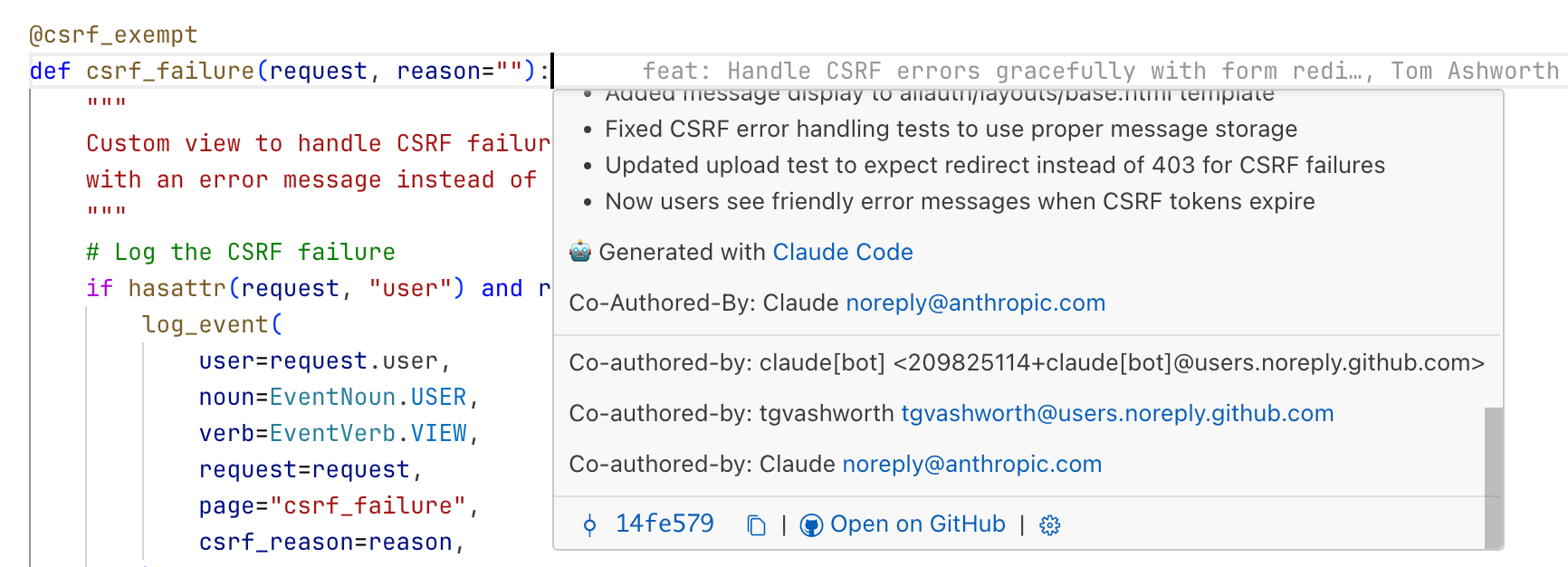
Attribution is already there, to an extent: if the commit is authored or co-authored by the agent, git blame tooling can tell you.
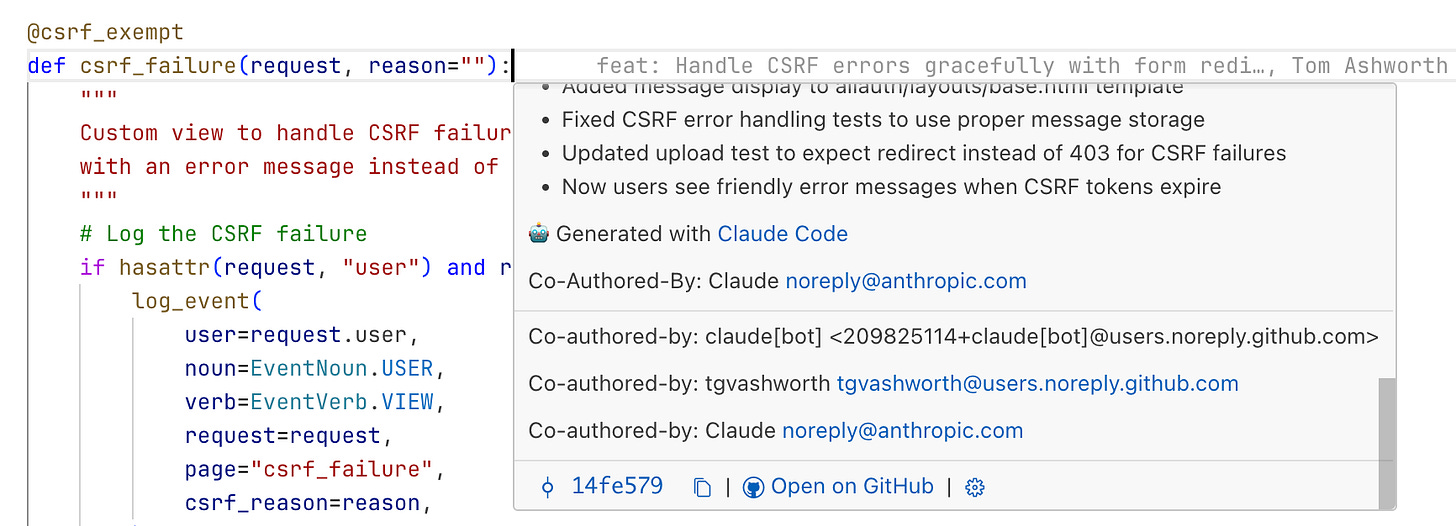
Claude can use blame, so it seems likely that a well-placed subtree CLAUDE.md and some clear instructions would theoretically allow devs to capture whether code should or should not be copied. I haven’t found these extra files to be hugely useful yet. However, I think the Gyrinx codebase is reaching a size where the root Claude is being selectively ignored by Claude Code, making me think it’s time to experiment with breaking them up.
More generally, the problem of "familiarity with the codebase” is real. I’ve been able to ship very fast with Claude, but it has meant context switching across branches an excessive number of times per day. That has affected my own memory of what I’ve worked on: there are whole features that I had forgotten we built. There are some areas that I only have a passing familiarity with, which may have led to bugs.
That said, this seems like it will be familiar to anyone who has tech led an older project: parts of the code will simply have passed out of the working memory of the team. I’ve found with Claude that traditional good development practices are good for the model: documentation (reference and other kinds, see Diataxis) and testing are essential. Oncall is one of the best ways to learn about your systems — especially the older, less modified parts — and with AI SREs coming out, it raised the question: how can our coding agents learn from oncall? Should Claude Code be connected to the incident response channel, documenting useful information straight back into the repository? Do these agents need external memory that they can recall on a per-topic basis, to avoid context growing too large or unwieldy?
The hiring metaphor is apt. You can tune that employee's permissions and knowledge more precisely than people realise. The agent configuration in Claude Code lets you specify what tools it can use, what needs confirmation, what model handles which task type. Commands are workflow shortcuts; skills supply domain knowledge on demand. Wrote the full breakdown here using OpenCode as the example (same architecture under the hood): https://blog.devgenius.io/no-commands-skills-and-agents-in-opencode-whats-the-difference-cf16c950b592